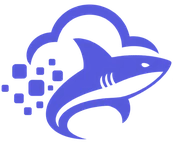
On Wednesday, October 21, 2026, the Node.js project shipped security releases for the 26.x, 24.x and 22.x release lines. The highest severity among the fixed issues is High, and the release includes four high-severity vulnerabilities, one of which involves remote code execution. If you run Node.js on your server, you should upgrade soon.
This post summarizes what was fixed and shows you how to upgrade Node.js in a few clicks from your SharkCluster dashboard.
What was released
The patched versions are:
| Release line | Patched version |
|---|---|
| Node.js 26.x | v26.12.1 |
| Node.js 24.x (LTS) | v24.22.1 |
| Node.js 22.x | v22.23.4 |
The release also updates several bundled dependencies that had public vulnerabilities: c-ares, Undici, OpenSSL (24.x and 22.x), SQLite (22.x), and a CA certificate update related to the eMudhra Intermediate CA compromise.
The vulnerabilities at a glance
High severity
- CVE-2026-111497: Brotli decoder out-of-bounds write. A flaw in the Brotli decoder can allow remote code execution. Affects 26.x, 24.x and 22.x. If your app decompresses Brotli data from untrusted sources, treat this as the most urgent fix.
- CVE-2026-105482: dns.resolve truncates names containing a NUL character. Affects 26.x, 24.x and 22.x.
- CVE-2026-105483: TLS certificate hostname bypass with fullwidth-digit IPs. Affects 26.x and 24.x.
- CVE-2026-106069: TLS certificate hostname bypass when a host loosely resolves to an IP address. Affects 26.x, 24.x and 22.x.
Medium severity
- CVE-2026-105481: A keep-alive socket can process a response that was written before the request was sent.
- CVE-2026-106072: Improper certificate validation for non-canonical IPv4 hostnames lets DNS SANs authenticate IP endpoints.
- CVE-2026-106074: The
crypto.randomUUID()andrandomInt()entropy caches can be saved into user-land startup snapshots and SEAs, so every process repeats the same values.
All three affect 26.x, 24.x and 22.x.
Low severity
- CVE-2026-106070: ZipFile returns attacker-controlled prefix bytes after failed ZIP header validation (26.x only).
- CVE-2026-106071: Permission Model filesystem over-grant via wildcard radix lookup (26.x only).
- CVE-2026-106073: Permission Model bypass with
fs.realpathSync(26.x, 24.x and 22.x).
Why this matters for your server
Three of the four high-severity issues relate to networking and TLS, which sit at the heart of most Node.js web apps and APIs. Hostname verification bugs can weaken the guarantee that your server is talking to the service it thinks it is. The Brotli issue is the most serious, since it is a path to remote code execution.
The Node.js project also notes that End-of-Life versions are always affected when a security release occurs. Patches are only published for the supported lines (26.x, 24.x and 22.x). If you are still running an older version, such as Node.js 20.x, you will not receive these fixes and should move to a supported line.
Before you upgrade
- Take a backup. Open the Backups tab on your server and create a fresh backup so you can roll back if needed.
- Check compatibility. If you are jumping major versions, review your dependencies and test your app on a staging server first.
- Pick a quiet window. The upgrade may briefly interrupt your Node.js app.
How to upgrade Node.js on SharkCluster
SharkCluster makes this a simple, guided process. No SSH or manual installation is needed.
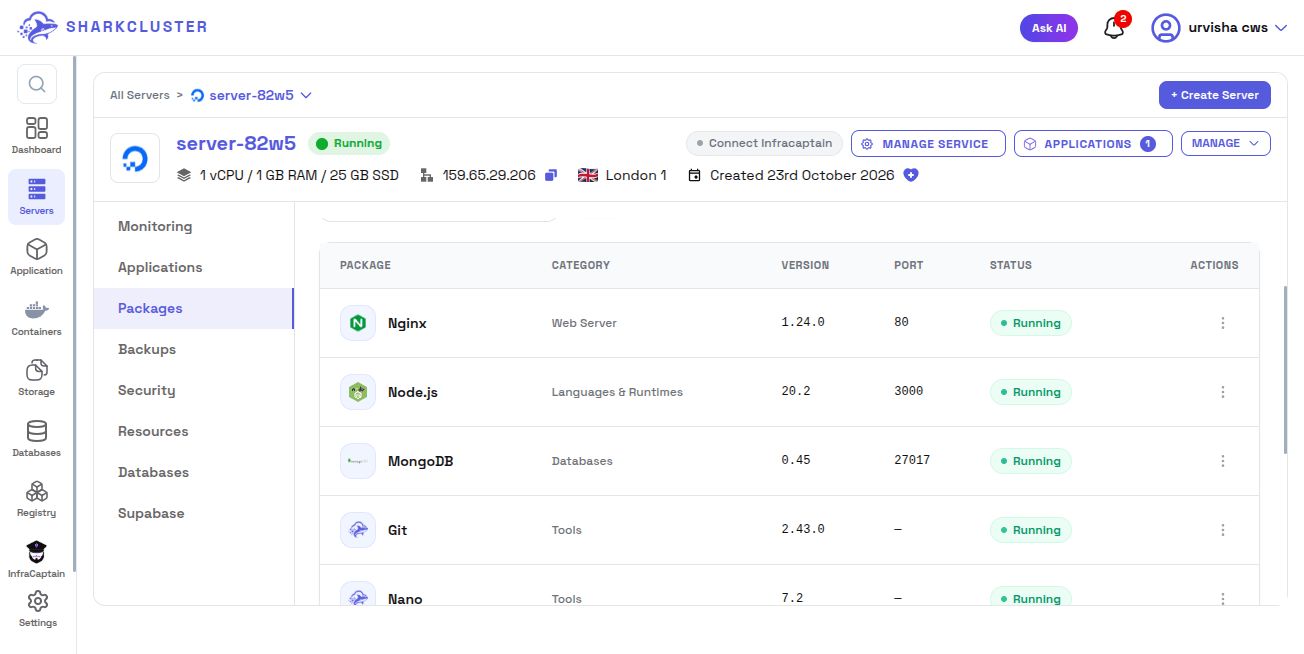
Step 1: Open your server's Packages tab
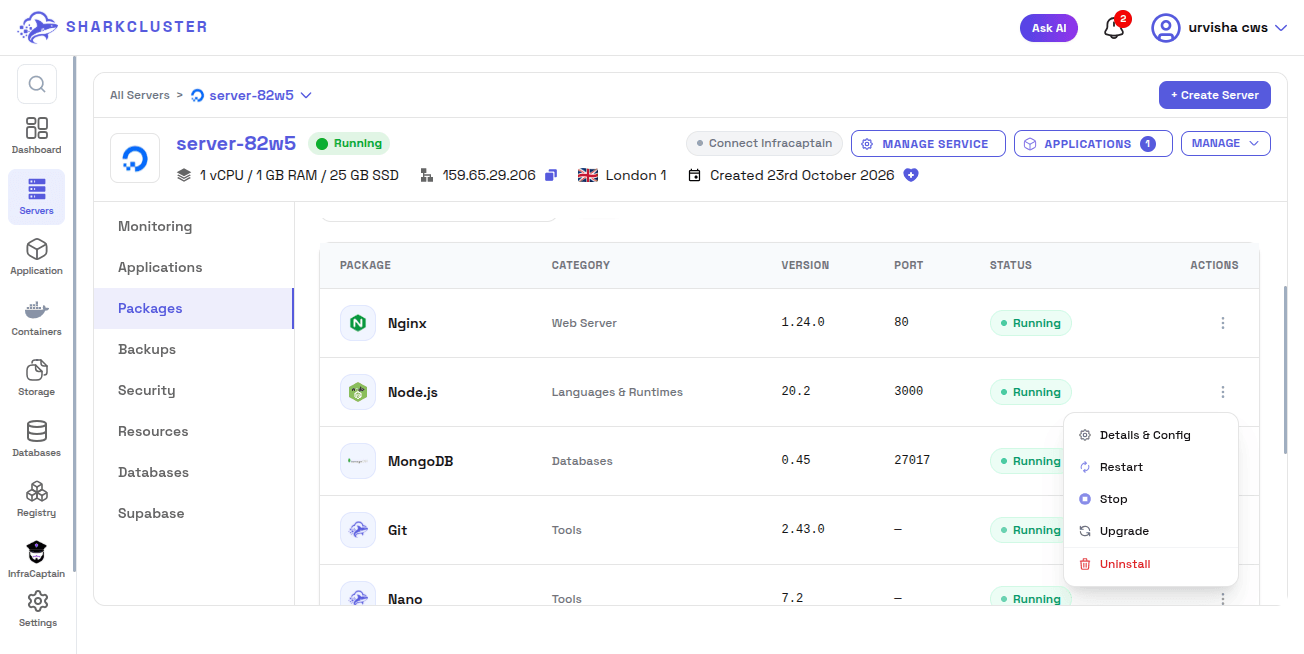
Log in to SharkCluster, go to Servers, and select your server. In the left-hand menu, click Packages. You will see every installed package with its category, version, port and status. In our example, Node.js is installed at version 20.2 and running on port 3000.
Step 2: Open the Node.js actions menu
Find the Node.js row and click the three-dot menu (⋮) in the Actions column. You will see these options: Details & Config, Restart, Stop, Upgrade and Uninstall.
Click Upgrade.
Step 3: Choose your target version
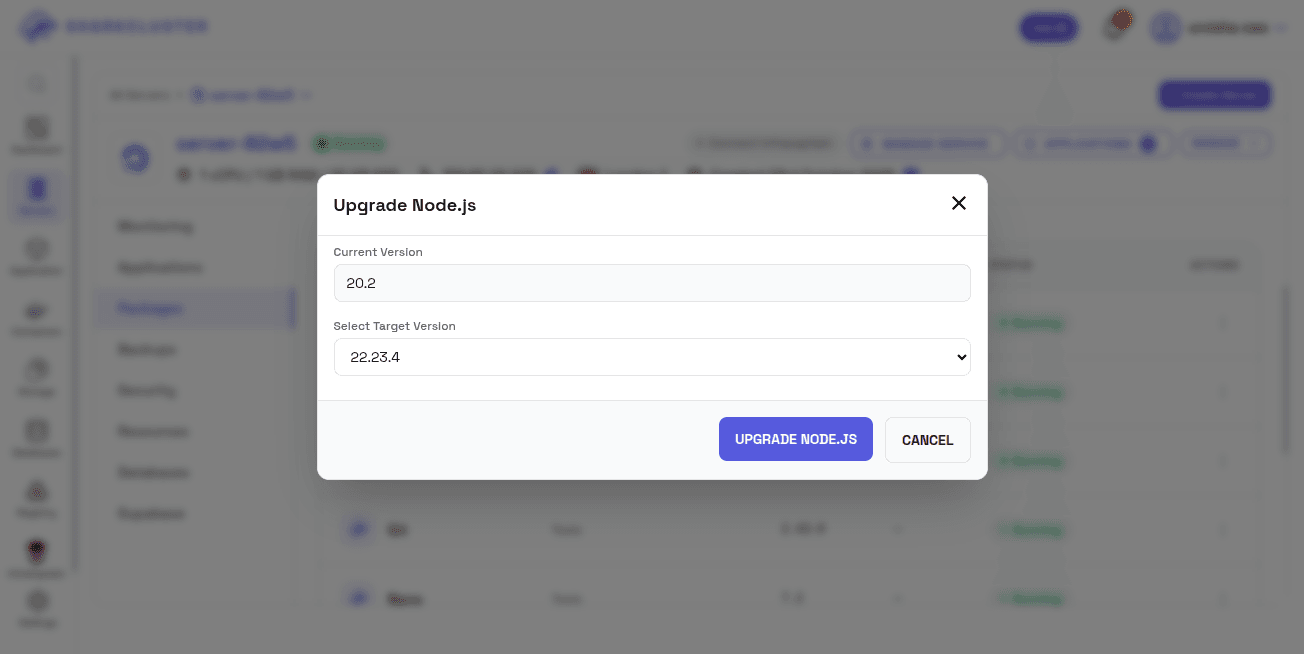
The Upgrade Node.js window opens. It shows your Current Version and a Select Target Version dropdown. Choose a patched version from the list, such as 22.23.4, or a newer patched release if one is available.
We recommend the latest patched version of a supported LTS line, since it gives you the security fixes plus the longest support window.
Step 4: Confirm the upgrade
Click Upgrade Node.js to start. Click Cancel if you want to back out. Once finished, the package list will show the new version number with a Running status.
Step 5: Verify
Back on the Packages page, confirm that Node.js shows the new version and is Running. Then load your application and check that it behaves normally. If you have terminal access, you can also run:
node -vIt should print the version you selected, for example v22.23.4. If your app uses PM2 or another process manager, restart it so it picks up the new runtime.
Security best practices going forward
- Stay on a supported release line. Check the official Node.js Release Schedule regularly.
- Apply security releases promptly. Subscribe to the low-volume nodejs-sec mailing list for announcements.
- Keep dependencies updated. Run
npm auditand update vulnerable packages. - Back up before changes. Use the SharkCluster Backups tab before any major update.
- Limit exposure. Keep Node.js behind Nginx, and only open the ports you need.
Conclusion
The October 2026 Node.js security releases fix serious issues, including a remote code execution flaw, and affect every supported release line. Upgrading takes only a few minutes on SharkCluster: open Packages, click the ⋮ menu next to Node.js, choose Upgrade, pick your target version, and confirm.
For the full technical details, read the official announcement: Node.js October 21, 2026 Security Releases.
Run this on your own VPS
Deploy servers and applications on infrastructure you own, managed from one panel — backups, caching, firewall and monitoring included.